

Long LaTeX build times can be a significant challenge for researchers and developers, hampering productivity and efficiency. This issue arises due to the complexity of LaTeX documents and the diversity of build systems available. We present a comprehensive comparison of LaTeX build systems, helping authors choose the most suitable one. By selecting a build system thoughtfully, authors can improve their workflow, reduce build times, and allow them to spend their time improving their actual research.
Updated June 2026
- We now measure ease of use including all sidecar configuration files.
llmkresults added. It places last on build time, but has a simple configuration.
Introduction
I still remember the issues I had, many years ago, trying to build my Master
thesis report using latex and dvips. Since then
my build process has gone through a few iterations, to simplify, to make it
faster, or to accommodate some new thing that I learned. Frustrated by the long
build times, I have tried many things which may or may not have helped. The
discussion (for example Speeding up LaTeX
compilation)
seems to be plagued by hearsay. For a typesetting system that is used by
scientists, the discussion is unexpectedly remarkably unscientific.
In this blog post we will go on an exploration of this rabbit hole, unraveling the intricacies of different LaTeX build systems. We will look at LaTeX compilation methods, comparing and contrasting different local build methods. By the end, you will likely choose another build system than you currently have.
Background
Why don’t just use Overleaf?
Overleaf is fantastic, but a local LaTeX build environment can offer advantages over Overleaf in certain situations. A key benefit is control. With a local setup, users have complete control over their LaTeX distribution, packages, configuration and development environment. For me, the enhanced privacy and security is the most important reason to using a local build environment.
Overleaf shines in collaborative and cloud-based settings when teams working on LaTeX documents can work simultaneously in the same document. It also eliminates the need to install and manage LaTeX distributions and packages, making it accessible to less experienced users.
Installing LaTeX
Your method of installing LaTeX varies with your operating system, the level of control you want, and other constraints. We will not go into this in detail here, see Getting LaTeX and Free TeX implementations. Once you have LaTeX installed, Bootstrapping your next LaTeX project and Top 10 LaTeX packages for academic writing are good next steps.
Building a LaTeX document
LaTeX employs a multi-pass typesetting process to enable various features like table of contents, lists of figures, cross-referencing, glossaries, indexing, and bibliographic citations. In this process, the data generated during one pass (compilation) is saved to intermediate files and then serves as input for any subsequent passes.
We have many choices to make here (see What are the pros and cons pertaining to
“latex -> dvipdfm” versus “latex -> dvips ->
ps2pdf”?
), but in this case we know we want a Portable Document Format (PDF), .pdf,
file. There are some differences depending on which workflow we pick here, but
for this document we can pick any of them.
The multi-pass typesetting process involves several steps to create a PDF
document with references using BibTeX and glossaries using makeglossaries:
-
Compilation with LaTeX. First we run
pdflatexon the input.texfile. This initial compilation generates an intermediate.auxfile containing information about citations, cross-references, and glossary entries. Since we are using the packageglossaries-extra, we also get amakeindexstyle file.istand an.acnfile. -
BibTeX for References If we have references in our document, we need to run BibTeX on the
.auxfile. BibTeX reads our bibliography database (.bib) and generates a.bblfile, which contains the formatted reference information. -
Glossaries with
makeglossariesIf we have a glossary in our document, we usemakeglossarieson the.auxfile.makeglossariesreads the glossary definitions and generates the necessary files to include glossary entries in our document. -
LaTeX Compilation (2nd Pass) Now we need to run
pdflatexon the.texfile again. This time, LaTeX incorporates the formatted references from the.bblfile into our document. If there are any citations, they will be correctly numbered and formatted in the reference list, but the citations themselves will be rendered as[?]. -
LaTeX Compilation (3rd Pass) Running
pdflatexon the.texfile once more ensures that glossary entries are properly integrated into your document and that citations are properly numbered. -
Final compilations We need to repeat the
pdflatexcompilation step as many times as needed to resolve all cross-references and ensure the document is correctly formatted. LaTeX may issue warnings or errors during this process that need to be addressed. In our case, for this document, we only need to runpdflatexthree times in total. -
PDF Generation Once all the necessary information is integrated into your document, a PDF file is generated as the output.
See File extensions related to LaTeX, etc and latex-auxfiles for more information on different file formats that you might encounter during the build process.
Method
The document
The example document we will use in the remainder of this post is based on the
IEEE conference
template (Shell, 2002). We will make some changes, for example adding a reference file
using BiBTeX and a glossary using the glossaries-extra package. We will also
add three example figures. These figures are available both in .eps and .pdf
format, so that we don’t need to run an expensive conversion process for each
figure. We will include these figures without the file suffix, for example
1
\includegraphics[width=.9\linewidth]{example-image-a}.


There are many things that effect the compilation times of a LaTeX document. See What affects compilation times, especially in longer documents?. The document we use here is short and doesn’t contain a lot of features, and we do this to keep compilation times low since we will be repeating this build many times.
You can view the source code for this document on Overleaf.
Timing measurements
To be able to compare the different methods, we will use a short timing script.
For each subdirectory it will run make clean test.pdf, 25 times each and
measure the time with /usr/bin/time. The different build methods fall into
different categories, see the following sections for a quick introduction to
each category.
Experiments
If you’d like to follow along at home, please take a look at this Gitlab repository.
Running bare commands
Here’s a short summary of how to build a LaTeX document using the pdflatex, bibtex, and makeglossaries commands in the terminal
pdflatex test
bibtex test
makeglossaries test
pdflatex test
This is the classical method, used by hopefully very few people and is included here for completeness.
arara
Arara (Island of TeX, 2023) is a build tool for TeX documents and other tasks. Arara
simplifies the compilation process by allowing users to define compilation
sequences through a user-friendly configuration in the source file itself. With
its intuitive but explicit inline-comment-based syntax, Arara lets you specify
various compilation steps, such as running pdflatex, bibtex, and
makeglossaries, in a defined order.
% arara: pdflatex
% arara: bibtex
% arara: makeglossaries
% arara: pdflatex until !found('log', 'undefined references')
latexmk
latexmk is a command-line tool designed to simplify the process of compiling
LaTeX documents. It automates the compilation workflow by intelligently handling
multiple runs of LaTeX and associated tools to ensure that all references,
citations, cross-references, glossaries, and bibliographies are resolved
correctly. latexmk is included in TeX Live. To customize the behavior of
latexmk we can use Perl-scripts, and here we give a short example of a
document specific configuration file that also includes makeglossaries.
1
2
3
4
5
6
7
8
9
10
11
12
13
14
15
16
add_cus_dep('glo', 'gls', 0, 'run_makeglossaries');
add_cus_dep('acn', 'acr', 0, 'run_makeglossaries');

sub run_makeglossaries {
  if ( $silent ) {
    system "makeglossaries -q '$_[0]'";
  }
  else {
    system "makeglossaries '$_[0]'";
  };
}

push @generated_exts, 'glo', 'gls', 'glg';
push @generated_exts, 'slo', 'slg', 'sls';
push @generated_exts, 'acn', 'acr', 'alg';
$clean_ext .= ' %R.ist %R.xdy';%
To compile a document we can run latexmk -pdflatex -bibtex -r latexmkrc main.tex.
See How does Overleaf compile my project? for a longer discussion on latexmk and customization.
rubber and rubber-info
rubber is a command-line tool designed to simplify the process of compiling LaTeX documents. Like latexmk, it automates the compilation workflow, aiming to provide a seamless and efficient way to handle LaTeX projects with various dependencies. We run this with the command rubber -d -m glossaries test.tex.
❯ pipenv run rubber-info test.tex
There was no error.
There is no undefined reference.
There is no warning.
There is no bad box.
scons
SCons is a Python-based Open Source build system that simplifies the process of building and managing complex projects.
1
2
3
4
5
6
7
8
9
10
11
12
13
14
# Make sure scons finds executables
import os
env = Environment(ENV=os.environ)

# Target and source files
pdf_output = env.PDF(target='test.pdf', source='test.tex')

# The Precious function is a method provided by SCons to mark a target
# as "precious" or "not to be deleted." This means that if SCons decides to
# delete temporary files or intermediate build artifacts after a build, it will
# not delete this particular target file even if it's considered an intermediate
# or temporary file.
# https://www.scons.org/doc/0.96.91/HTML/scons-user/c1924.html
env.Precious(pdf_output)
latexrun
latexrun is a Python-based LaTeX builder designed to fit into a larger build
system. It hides the circular dependencies of compiling LaTeX documents and
shows errors and warnings in a user-friendly format.
See LaTeX run. Run latexrun.. Here we use a fork of latexrun that also supports makeglossaries.
Using a precompiled preamble
The first part of your document, the preamble, changes must less often than the body of the document. We can use this to our advantage by pre-compiling the preamble. We need to split our file into a preamble, and a body part and annotate each part properly.
The preamble should end with \endofdump.
1
2
3
% static part
...
\endofdump
We can compile this part with LaTeX in the following way
latex -ini -jobname="preamble" "&latex" mylatexformat.ltx "preamble.tex". This
will result in a file called preamble.fmt which we can reference in the body
of the document with
1
2
3
4
%&preamble
\endofdump
\begin{document}
...
See Faster LaTeX part IV: Use a precompiled preamble and Glossaries and mylatexformat incompatible?.
Ramdisk
Mounting a directory as a RAM disk can significantly speed up tasks like LaTeX compilation by using RAM for storage instead of the hard drive. Here we create a small RAM disk that just fits our document. How to mount the ramdisk in practice depends on your operating system and the details are therefore left to the interesting reader to figure out.
Flags
In LaTeX, flags like batchmode and draftmode can help you optimize the
compilation process. Using batchmode suppresses most output, making the build
faster and less cluttered in the terminal. This is useful when you’re confident
your document is mostly error-free and want a quicker compile. The draftmode
flag, on the other hand, speeds up compilation by skipping the inclusion of
images and performing only minimal typesetting. This is great for quick previews
where fine details aren’t necessary, such as early steps in the compilation
process. Both flags can be added when running pdflatex or other LaTeX
compilers, like pdflatex -interaction=batchmode test.tex or pdflatex
-draftmode test.tex.
Dvips
In the early days of LaTeX, the standard workflow involved compiling the LaTeX
source code into a Device Independent (.dvi) file. This format was
platform-agnostic but not easily shareable or viewable. To produce a more
accessible Portable Document Format (.pdf), users had two primary routes:
- Convert .dvi to PostScript (
.ps) usingdvips, and then convert the.psfile to.pdfusingps2pdf. - Use
dvipdfmto directly convert the.dvifile to.pdf.
These methods were often cumbersome but necessary prior to the advent of pdfLaTeX, which allowed for direct compilation to .pdf files. We will include these older pipelines in our list of experiments to provide a more comprehensive view of the evolution of LaTeX.
llmk
llmk (Takuto Asakura, 2025) is a lightweight LaTeX build tool that takes a minimalist
approach: configuration lives either in a .llmk.toml file or as magic comments
embedded directly in the .tex source, eliminating the need for a separate build
script. It handles multiple compilation passes automatically, similar to
latexmk, but with a simpler configuration surface. Build a document with
llmk document.tex.
Results
Build-system benchmark summary (n=25 runs per system, time as mean ± 95% CI).
| Build system | Time [s] (mean ± 95% CI) | stdout lines | PDF size [kB] | Make target [chars] |
|---|---|---|---|---|
max_combo |
2.23 ± 0.08 | 53 | 48 | 173 |
preamble |
2.31 ± 0.04 | 142 | 74 | 555 |
latex_dvipdfmx_z0 |
2.49 ± 0.02 | 417 | 85 | 87 |
latexrun_ramdisk_preamble |
2.50 ± 0.02 | 18 | 133 | 20 |
latex_dvipdfmx |
2.51 ± 0.04 | 417 | 48 | 83 |
latex_dvipdfm |
2.51 ± 0.03 | 417 | 48 | 82 |
latex_dvips |
2.51 ± 0.02 | 418 | 74 | 95 |
latexrun_preamble |
2.52 ± 0.02 | 18 | 133 | 20 |
latex_dvips_batchmode_draftmode |
2.54 ± 0.03 | 138 | 74 | 163 |
latex_dvipdfmx_z9 |
2.56 ± 0.12 | 417 | 48 | 87 |
batchmode_draftmode |
2.79 ± 0.02 | 50 | 133 | 176 |
draftmode |
2.79 ± 0.03 | 444 | 133 | 107 |
compress_batchmode_draftmode |
2.80 ± 0.04 | 50 | 184 | 176 |
compress |
2.80 ± 0.02 | 464 | 184 | 76 |
original |
2.80 ± 0.03 | 464 | 133 | 74 |
latexrun_ramdisk |
2.81 ± 0.02 | 18 | 133 | 20 |
latexrun |
2.81 ± 0.04 | 18 | 133 | 20 |
batchmode |
2.82 ± 0.02 | 50 | 133 | 154 |
rubber |
3.55 ± 0.08 | 40 | 133 | 44 |
arara |
3.55 ± 0.06 | 33 | 133 | 151 |
latexmk_overleaf |
3.69 ± 0.03 | 571 | 133 | 10573 |
latexmk |
3.71 ± 0.09 | 563 | 133 | 440 |
latexmk_batchmode |
3.79 ± 0.03 | 47 | 133 | 489 |
scons |
3.91 ± 0.04 | 460 | 133 | 588 |
latexmk_batchmode_draftmode |
4.43 ± 0.03 | 540 | 133 | 579 |
llmk |
5.62 ± 0.02 | 934 | 133 | 885 |
Build times
Our most important metric, and the one we set out to measure in the beginning, is the build time. Faster build times allows you to iterate more quickly through drafts. For those new to LaTeX, a slow build process can be discouraging, and comparing to other systems such as Typst, LaTeX is slooow. For me personally, long build times can interrupt my flow and concentration, impacting overall productivity.
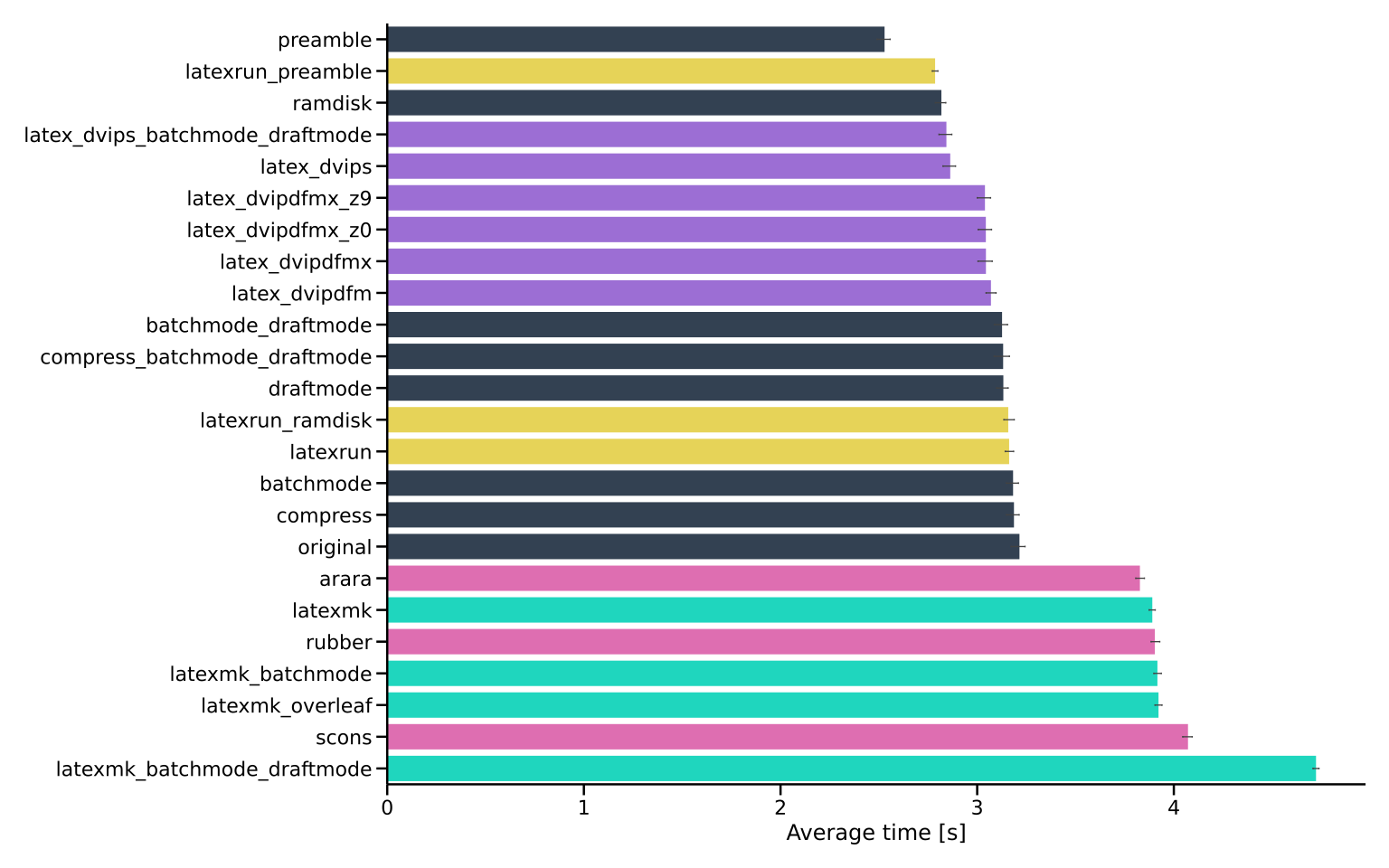
The build system with the fastest build time is max_combo with an average build
time of only 2.23 seconds – a combination of a precompiled preamble, latex via
dvi, draftmode on the early passes and -interaction=batchmode. This speeds up
the build a lot! In fact, in the top-3 of the list we see a lot of the same type
of pipeline. However, max_combo is a little bit complex to setup, as we will
take a look at in Ease of use. The fastest build is now 20% faster than the
naive baseline and 40% faster than latexmk. Interestingly, one of the newest
tools llmk is the slowest.
Manageable output
Human-understandable output, especially during errors, is crucial in LaTeX
document building, since LaTeX is notoriously bad here. Most of the information
printed isn’t very useful, so it would make sense to try and reduce this and
keep the output to a minimum and restrict it to errors and warnings. In this
test we simply count the number of lines on stdout, but it should be said that
some of these build systems, such as latexrun have really nice colored output
in the case things do go wrong.
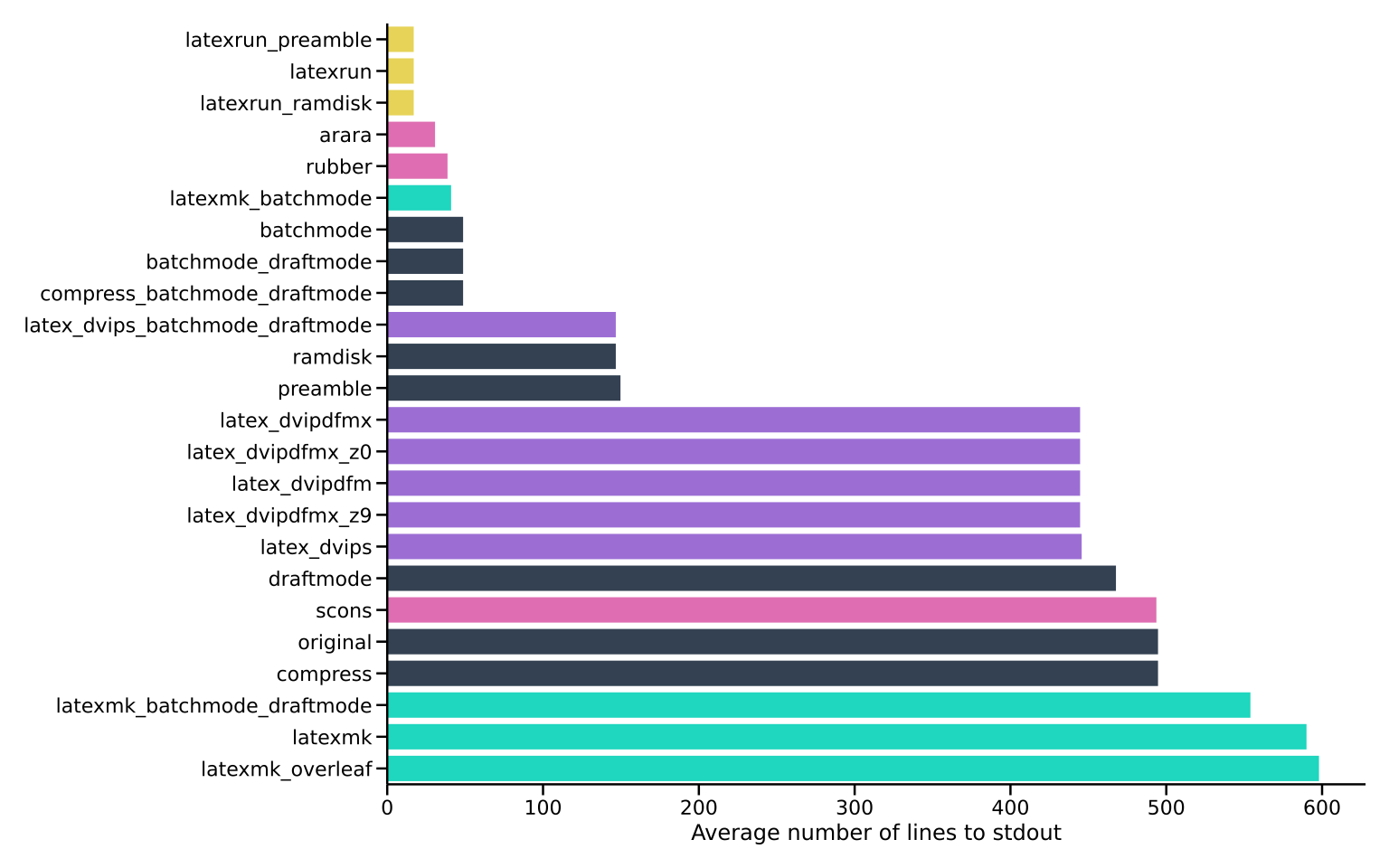
The first part of the list is dominated by build tools such as latexrun,
arara and rubber that hide clutter and only show errors and warnings.
Ease of use
A build system must of course be easy to use, and as a proxy for that we measure
the number of characters in the Makefile target + any sidecar configuration files (this is new since the 2023 post.) In the case that you do use a
Makefile, simply running make would of course be easy enough.

Personally, I don’t mind a little bit more complicated setup since I do it once and just copy for all new projects.
File size
A smaller file size offers advantages in terms of ease of handling, quicker uploads, and efficient storage. Therefore, the file size serves as a crucial parameter in evaluating performance.

It is interesting that there is such a big difference between the smallest and largest file size, even for such a simple document. For normal use this has little effect in 2026.
Final score
In the spirit of Eurovision and Melodifestivalen, we will adopt a point allocation system that mirrors the excitement and competition of these iconic music events. In Eurovision, each participating country awards points to their favorite songs, with the famous ‘douze points’ (12 points) reserved for the top choice. Similarly, the runner-up receives 10 points, acknowledging outstanding performances, and we will continue this tradition here.
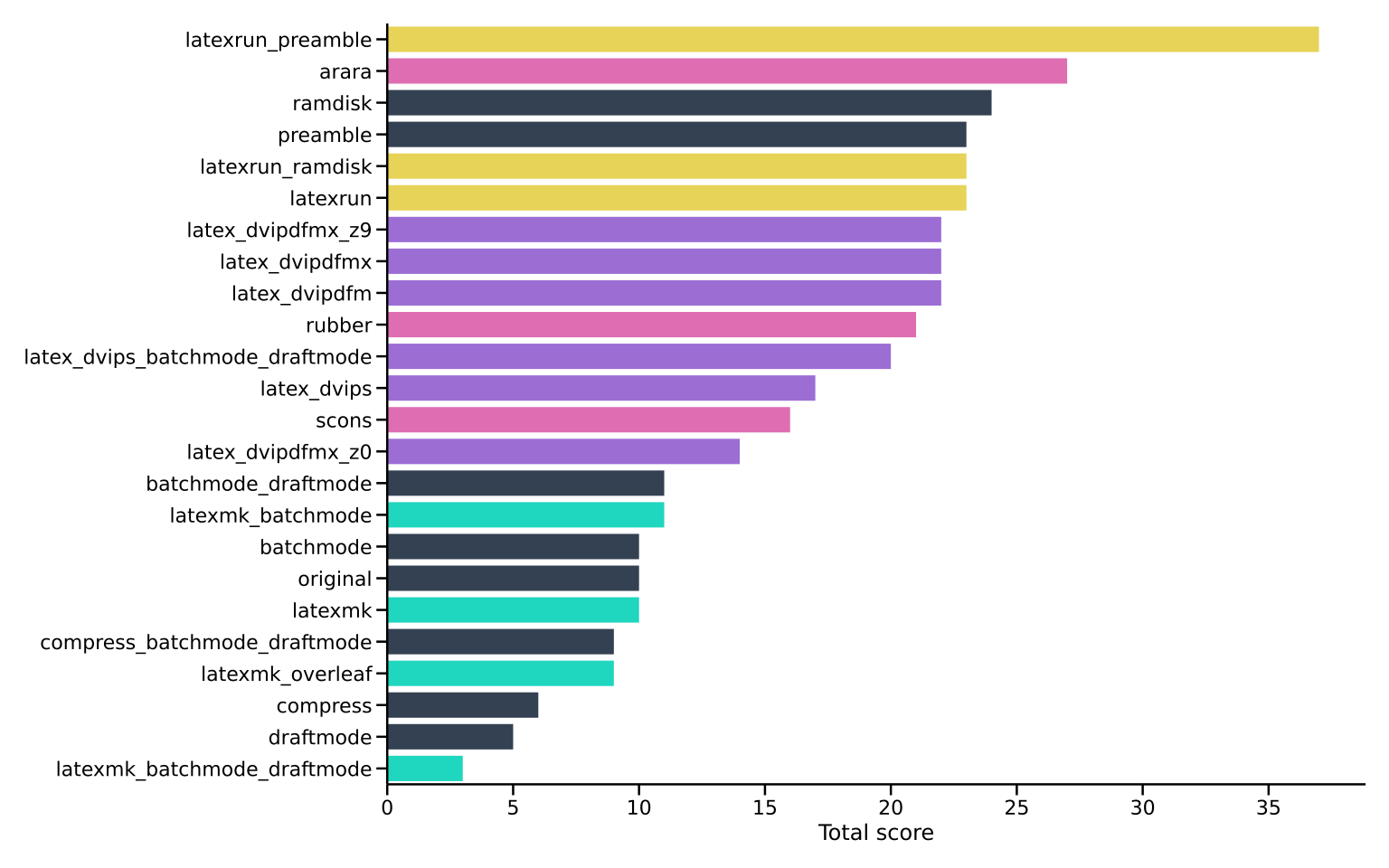
The build system with the greatest final score is latexrun_ramdisk_preamble –
a combination of a precompiled preamble, a ramdisk, and latexrun.
We have seen how we can improve the compilation time for a small toy project,
but these improvements carry over to real documents as well. For example,
compiling a recent IEEE paper using latexrun took 16.87 seconds compared to
25.71 seconds using latexmk.
Related work
There are many general build systems such as Snakemake (Koster & Rahmann, 2012), GNU Make, CMake, etc that can be used also to build LaTeX documents. There are also many LaTeX specific build systems such as make-latex, AutoLaTeX and ltx2any, that didn’t make it into this comparison for one reason or another and I hope to return to them at a later date.
Each of these tools can be used in a more general pipeline as explored in How to annoy your co-authors: a Gitlab CI pipeline for LaTeX .
If you have many TikZ (Feuersänger et al., 2014; Tantau, 2007) or pgfplots (Feuersänger, 2014) figures, it might be worthwhile to externalize them (Wenneker, 2012). See also Create publication ready figures with Matplotlib and TikZ.
Discussion and limitations
In this blog post, we have tried to cover the most common build systems and tool combinations for LaTeX document compilation. These systems have been chosen based on their popularity and widespread use within the LaTeX community. However, we should recognize that the world of LaTeX is vast, and new tools and approaches are continually emerging. Let me know in the comments if your favorite build system is not covered!
Since the writing of this post (2023), Tectonic has matured as a XeTeX-based
alternative. We exclude Tectonic here because it replaces the pdflatex engine
making it incompatible with the IEEE pipeline.
Therefore, one obvious limitation of this blog post is its inevitable inability to encompass every possible LaTeX build system and tool combination. The LaTeX ecosystem is dynamic, with developers and enthusiasts constantly devising innovative ways to streamline the document creation process. As a result, there may be niche or specialized tools that we have not explored here.
Some characteristics of a build system might be more important to you than others. For
example, the output from latexrun in the case of a fault is much easier to
read than for other build systems, and it leaves a build directory that is
almost clean. However, build directory cleanness is not measured in this blog
post.
Your choice of a LaTeX build system should of course be guided by your individual preferences and workflow requirements. For example, when selecting a build system, consider factors such as your operating system and LaTeX distribution. Some tools are more compatible with specific platforms, and this compatibility restricts what options are available to you.
FAQ
Which build system should I use?
latexrun with a precompiled preamble is the best all-round choice: lowest stdout
noise, clean error output, and near-top build speed with minimal configuration.
If raw speed is the only priority and you don’t mind a more complex setup,
max_combo wins on time.
Does this apply to large real-world documents?
Yes. Compiling a recent IEEE paper with latexrun took 16.87 s versus 25.71 s
with latexmk — the relative gains hold as document size grows.
What about LuaLaTeX or XeLaTeX?
All measurements use pdflatex, which is required by many academic conferences
and journals (including the IEEE template used here). Some findings may transfer
to other engines, but we have not tested this.
Why is llmk the slowest?
llmk placed last in our benchmark at 5.62 s — roughly double latexrun. We
haven’t identified the specific cause; it may warrant a separate investigation.
Conclusion
For LaTeX document compilation, choosing the right build system is an important,
but often overlooked, decision. While each system we explored has its strengths,
latexrun emerges as the champion, combining efficiency, reproducibility, and
versatility in a single package.
Now, let’s use the regained seconds to improve what truly matters – your content.
AI Disclosure
The original benchmarks were run in 2023. The 2026 update — including the revised
ease-of-use methodology, llmk results, and quality improvements to this post —
was developed with AI assistance (Claude by Anthropic).
References
- Shell, M. (2002). How to use the IEEEtran LATEX class. Journal of LaTeX Class Files, 12.
- Island of TeX. (2023). arara — The cool TeX automation tool. https://islandoftex.gitlab.io/arara/
- Takuto Asakura. (2025). llmk — Light \LaTeX Make. https://ctan.org/pkg/light-latex-make
- Koster, J., & Rahmann, S. (2012). Snakemake — a scalable bioinformatics workflow engine. Bioinformatics, 28(19), 2520–2522. https://academic.oup.com/bioinformatics/article-lookup/doi/10.1093/bioinformatics/bts480
- Feuersänger, C., Menke, H., & Tantau, T. (2014). TikZ & PGF manual. https://www.ctan.org/pkg/pgf
- Tantau, T. (2007). The TikZ and pgf Packages. 1–405. https://www.ctan.org/pkg/pgf
- Feuersänger, C. (2014). Manual for Plotting Package pgfplots. 1–500. https://ctan.org/pkg/pgfplots
- Wenneker, F. (2012). Faster LaTeX part II: External TikZ library. https://web.archive.org/web/20160724213512/http://www.howtotex.com/tips-tricks/faster-latex-part-ii-external-tikz-library
Suggested citation
If you would like to cite this work, here is a suggested citation in BibTeX format.
@misc{isaksson_2023,
  author="Isaksson, Martin",
  title={{Martin's blog --- Which LaTeX Build System Is Fastest? A Benchmark}},
  year=2023,
  url=https://blog.martisak.se/latex-build-systems-comparison/,
  note = "[Online; accessed 2026-07-12]"
}